
If you have enabled IMU Integration, you must perform the full calibration procedure before you can start to produce meaningful test results. The calibration procedure is a series of specific manoeuvres that you should perform to help the Kalman Filter characterise the outputs from the IMU.
If you do not perform the calibration procedure, the Kalman Filter will still function. It may, however, not produce a high level of accuracy until after you have performed dynamic manoeuvres in the X and Y plane (i.e. left and right-hand turns, braking and accelerating) which could take several minutes of driving.
- Park the vehicle in an open area where the GNSS antenna has a clear view of the sky.
- Make sure that you have RTK fix.
- Remain static and wait for the IMU to complete the 30-second stationary initialization.
IMPORTANT
If the IMU detects movement before the initialisation finishes, the 30-second process will restart as soon as the vehicle is stationary again.
- When the LED on the front panel of the IMU changes from flashing orange to flashing green, drive forward to complete the initialisation of the IMU.
- Continue to an open area where you can perform the calibration procedure.
- Drive in a figure of eight at least twice.
The vehicle should be at a speed of more than 5 km/h during this procedure to generate sufficient force for the calibration process.
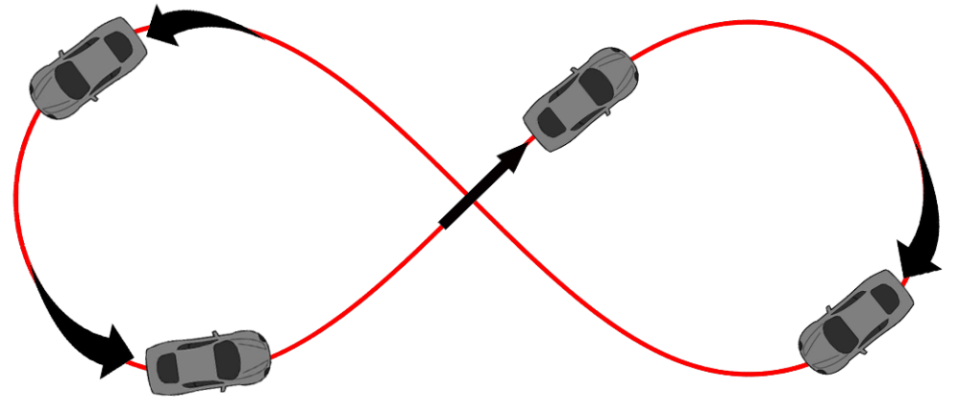
- Perform the following manoeuvre twice:
- Accelerate from a standstill to at least 50 km/h.
- Apply the brakes to achieve a minimum deceleration of 0.5 g.

Re-Running the Calibration
The Kalman Filter is constantly adapting its calibration depending on the information it receives from the GNSS receiver and the IMU. Therefore, if the vehicle is left stationary for a long time, or if an External IMU is moved from its mounting position, you should repeat the calibration procedure.
The calibration should also be repeated if there has been a communication break between the VBOX unit and the External IMU, such as:
- You power cycle either the VBOX unit or the External IMU.
- You change the VBOX IMU settings.
- You use the VBOX Setup Software to read the VBOX unit's settings.
- You use the VBOX Setup Software to read the External IMU settings.
- You perform a GNSS coldstart.
Operation Without Calibration
If the procedure cannot be completed as described above, the speed accuracy of the IMU and VBOX data may be reduced, particularly during the first few minutes of operation, while the Kalman filter calibrates.