
Understanding and Using Digital Gain in Low-Level GNSS Signal Recording
Overview
In GNSS signal recording applications, particularly when using low-bit quantization (e.g., 2-bit or 4-bit) to reduce file size, the signal amplitude can become compressed. As a result, the full dynamic range from the analogue-to-digital converter (ADC) is not used, and weak signals may not be captured clearly.
Digital gain is applied after the ADC to rescale the recorded signal to make better use of the available quantization levels. This will improve the representation of low-level signals in the recording without changing the analog front-end configuration.
Why Digital Gain Is Useful
1. Better Use of Low-Bit Quantization
With 4-bit quantization, the ADC input can only represent 16 possible levels. If the GNSS signal is weak and the Automatic Gain Control (AGC) in the LabSat unit has already reached its upper limit, the resulting I/Q samples will only occupy a fraction of the available 4-bit dynamic range.
-
Without digital gain: The recorded scatter plot shows I & Q samples clustered near the centre, leaving several quantization levels unused.
-
With digital gain (e.g., +2): The signal is scaled digitally, occupying more of the available range. This increases the visible detail of low-level GNSS signals and can improve measurement quality during replay.
2. Improved Low-Level Signal Detail
Applying digital gain carries a small risk of occasional full-scale saturation, but it generally captures more granularity in weaker signals. This is particularly useful when:
-
Recording in attenuated or low C/N₀ environments.
-
Performing post-processing applications.
-
Reducing the recording size without losing detail.
3. No Impact on the Analog Front-End
Digital gain is applied after the ADC stage. It does not introduce analogue noise or distort the RF chain; it simply rescales digital samples for improved quantization efficiency.
How Digital Gain Works
Digital gain multiplies incoming I/Q samples by a user-selected factor (e.g., +1, +2, ... +7).
This will cause the following:
-
Expanded amplitude of the samples in the available bit depth.
-
Improved representation of low-level signal details.
-
AGC-limited signals are allowed to use more of the quantization range.
For example, adding +2 digital gain to a 4-bit stream moves the sample points outward toward full-scale limits, increasing the “spread” in the scatter plot and capturing more detail.

The two scatter plots above show 4-bit quantized I & Q data from a low-level signal where automatic gain has reached its upper limit. In the left plot, the data does not occupy the full range of the 4-bit scale. The right-hand plot shows the effect of adding 2x digital gain. Although this shows that there is a greater possibility of the ADC hitting full-scale, more of the low-level signal information is captured.
Implementation in LabSat 4
Background:
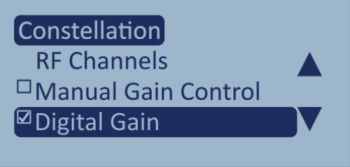
Digital Gain mode is available in the Constellation menu in LabSat 4. It is designed to be used with 2- or 4-bit quantization, where LabSat 4 receives low-level signals.
Current Implementation:
-
You can find the Digital Gain setting in the Constellation menu on LabSat 4 Record and Replay units.

-
When the Digital Gain is set to any value over 0, the tick in the box next to the setting indicates that Digital Gain is enabled and active.
-
You can adjust the Digital Gain to any value between 0 and 7.
| Level | 0 | 1 | 2 | 3 | 4 | 5 | 6 | 7 |
| dB | 0 | 6 | 12 | 18 | 24 | 30 | 36 | 42 |
-
For most low-level signal applications, we recommend using a value of 1 or 2.

Example Test: 4-Bit GNSS Recording with and Without Digital Gain
Test Setup – Record Phase:
-
Coldstart the GNSS receiver.
-
Start the recording on LabSat 4.
-
When the recording is ended, LabSat 4 will capture the UTC and C/N₀ level from the receiver.

Replay Phase:
-
Coldstart the GNSS receiver before replaying the file.
-
The C/N₀ values recorded at the matching UTC timestamp will be compared.

Observations:

No gain: Scatter plot shows compressed sample distribution

+2 digital gain: Scatter plot shows improved fill of the 4-bit scale
When using Digital Gain, the replayed C/N₀ values are slightly lower (1 to 2 dB delta) but will closely match the original recording.

| Note: 'Record dB' are the levels from the GNSS receiver when LabSat 4 was recording. 'Replay dB' are the levels from the GNSS receiver when LabSat 4 is replaying the recorded file to the receiver. |
This demonstrates that while replayed C/N₀ levels may be slightly reduced, the integrity of the recorded signal is preserved and that digital gain improves the captured detail in low-bit recordings.
When to Use Digital Gain
| Use Digital Gain | Avoid or Limit Digital Gain |
|
|
Summary
Digital gain is a practical tool for enhancing GNSS recordings made with low-bit quantization. By multiplying digitized samples, it allows better use of the limited quantization range, improving low-level signal representation without affecting the analogue front-end. In LabSat 4, Digital Gain is adjustable from 0–7, with recommended values of 1–2 for most low-level signals. Testing confirms that digital gain enhances signal detail while maintaining accurate replay correlation, making it a valuable feature for compact yet high-fidelity GNSS data capture.