
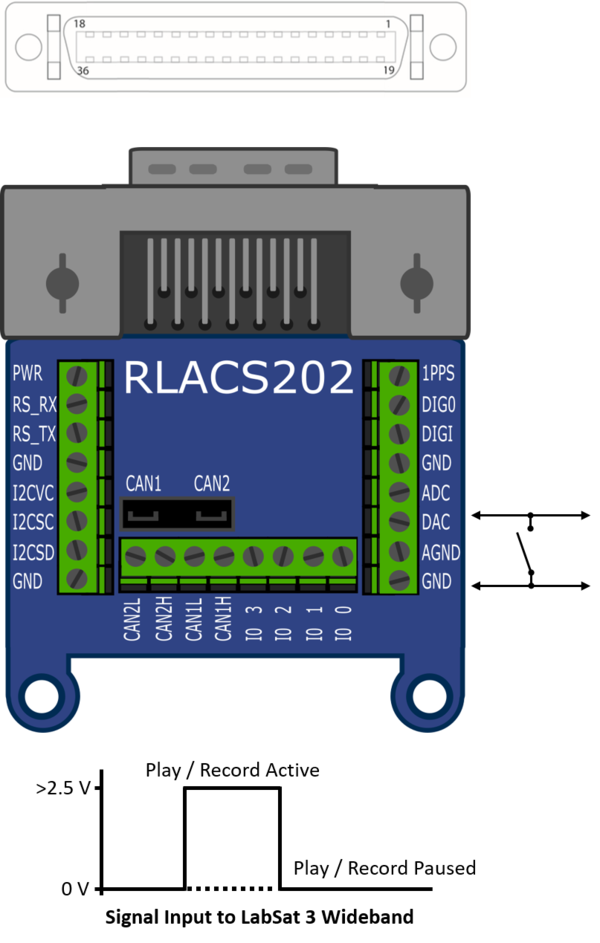
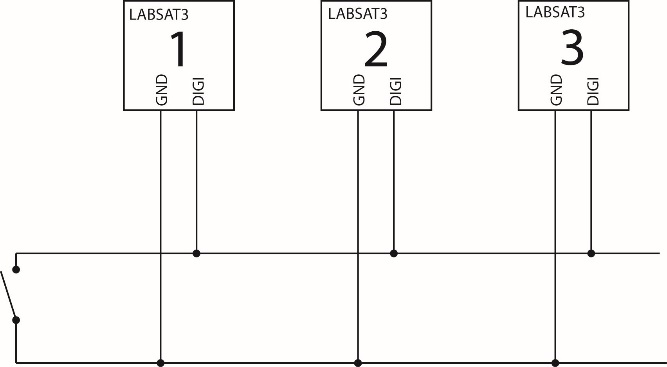
When ‘Ext Sync’ is enabled within the LabSat 3 Wideband menu, the DIGI2 pin on the expansion connector can be used to pause record or replay allowing synchronisation of multiple LabSats or simply a remote trigger to record/replay.
This is achieved when a low voltage (0 V) is applied, the DIGI pin is internally pulled up to approximately 5 V, so it is possible to pause the record or replay activity simply by connecting the DIGI input to GND via a switch.
Synchronising multiple LabSat 3 Wideband systems to record at the same time is possible by setting DIGI low (closed switch between DIGI2 and GRND), then pressing the record button on each LabSat and bringing DIGI2 high (open switch) to start data transfer. Synchronised replay can be achieved using the same method.
NOTE
The DIGI2 pin (DAC pin on RLACS202) will only operate as a PAUSE function when DIGI2 is not configured in any of the digital channels.