
This page of the Web Server is designed to allow you to control record and replay functionality of your device remotely. On this page, it is also possible to navigate through the connected LabSat’s SSD file structure and there is the ability to rename or delete any of the present files.
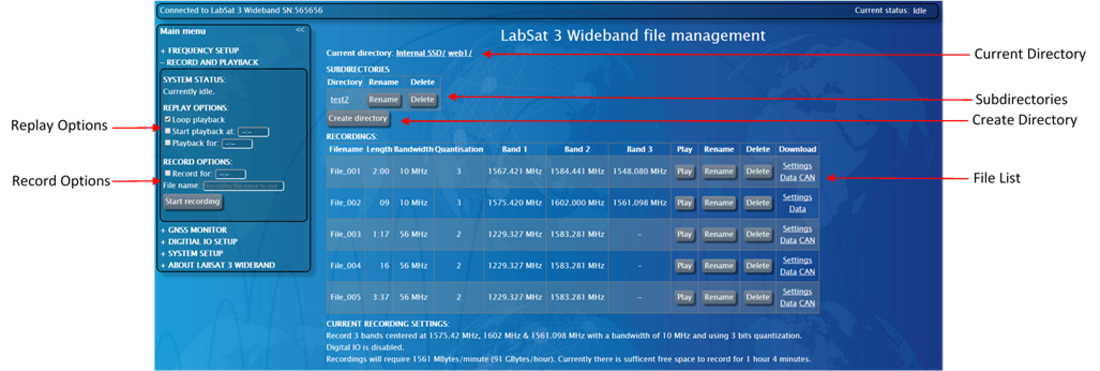
- Replay options
In this section, you can set:- Loop playback where the selected file will replay continuously
- Start playback at a specific time in the scenario
- Set the duration of the playback
- Record options
This section enables you to start a new recording and enter a name for the file.
Additionally, you can specify a recording duration - how long the LabSat will record. - Current Directory
A full file path will be displayed with the accessed directory being last in the list.
To return to a specific directory on the SSD, simply click on the required directory in the file path. - Subdirectories
All subdirectories contained within the open directory will be displayed here, to access them, click on the folder name. - Create Directory
This allows the user to create a new directory within the LabSat 3 Wideband internal SSD. - File List
Files within the current directory will be listed. Options to play, delete or rename files are also present in this list.
Download links associated with each file allow you to view the setting used during the files recording, download the recording and view CAN data if applicable.
NOTE
Some file/browser combinations require you to right-click and select 'Save as' to download a recording.