
NOTE
Requires the LabSat Turntable Simulator.
Before configuring the turntable control system, fully connect the turntable device using the LabSat Turntable Solution setup diagram. Complete all hardware connections before starting the LabSat software application.
Once the software is running, the serial number of any connected USB turntable device automatically appears in the Turntable dropdown menu.
To test communication between the software and the turntable device, click Test. The turntable performs a predefined manoeuvre to confirm communication.
If the turntable does not respond:
- check all hardware connections,
- then restart the software.
NOTE
For turntable connection and setup information, refer to the Turntable User Guide.
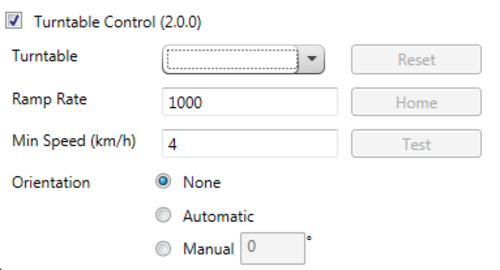
When not controlled by a replay scenario, the turntable remains released and free to move. If the turntable remains locked by the software, click Reset to release it.
The Home button moves the turntable to its home position, aligned to due North.
During scenario replay, the starting orientation of the turntable can be controlled using three modes:
- None
- Automatic
- Manual
Leaves the turntable in its current orientation when replay starts.
Automatically rotates the turntable to the heading direction derived from the first recorded heading sample in the replay scenario.
If a synchronised Video VBOX .vbo file is loaded, the orientation occurs immediately. Otherwise, orientation is delayed until the GNSS Monitor captures the first valid moving heading sample.
Allows a specific heading angle to be entered manually. When replay starts, the turntable rotates to the specified heading relative to the turntable home position (due North).
The following turntable limits can be configured during scenario replay.
Defines the minimum replay speed, in km/h, required before the turntable responds to heading changes.
For example, if the minimum speed is set to 2.5 km/h, the turntable does not respond while replay speed remains below this value.
The default setting is 4 km/h.
Defines the maximum acceleration and deceleration rate of the turntable.
The default setting is 1000 °/s.