
Please register your VBOX unit so that Racelogic can continue to provide you with notifications about the latest software releases and firmware upgrades for your Racelogic product, and offer technical support.
Register your product here.
Please register your VBOX unit so that Racelogic can continue to provide you with notifications about the latest software releases and firmware upgrades for your Racelogic product, and offer technical support.
Register your product here.
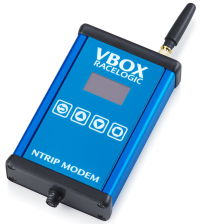
When you purchase a VBOX NTRIP Modem, you will find the following items when you open the box:
| Product Code | Quantity | Description |
|---|---|---|
| NTRIPMDM-V1 | 1 | NTRIP Modem Unit |
| RLCAB170 | 1 | Cable 2m (Hirose 6W Plug to Lemo 5W plug) |
| TTV2AMBBLK0.5M | 1 | Cable 0.5 m (USB Type A to USB Type B) |
| ANTMSTUBSMAM | 1 | Cellular Antenna with SMA connector |
| Product Code | Description |
|---|---|
| RTK-enabled GNSS receiver or VBOX system | The modem outputs RTCM corrections to a compatible receiver. |
| GNSS antenna | Required for the GNSS receiver, not the modem itself. |
| Connection cable to GNSS receiver | Typically the supplied RLCAB170 cable, which provides both:
|
| Internet connection source (choose one) |
|
| Product Code | Description |
|---|---|
| Cellular antenna (SMA connector) | Required for LTE operation only. The VBOX NTRIP Modem comes supplied with a cellular antenna. |
| SIM card | Standard SIM card required for accessing the Internet via LTE. Only required when using the internal LTE Modem. |
| External Wi-Fi network/hotspot | Network connection for accessing the Internet via Wi-Fi. Only required when not using the internal LTE Modem. |
| USB Cable | For firmware updates. The VBOX NTRIP Modem comes supplied with a 0.5 m USB cable. |
The NTRIP Modem requires a 12 V DC power supply and can operate within a 7–30 V DC input range.
Power is typically supplied via the VBOX connection cable or through the USB interface.
For complete electrical specifications, see Technical Specifications.
The NTRIP Modem does not technically require installation media, but for normal operation it does require:
- Internet access to an NTRIP correction service
- NTRIP service credentials (from an NTRIP provider)
To configure the modem you will typically need to provide the following information:
- NTRIP caster address
- port number
- mountpoint
- username/password (if required)
The NTRIP Modem requires an Internet connection to receive GNSS correction data from an NTRIP caster. The modem must be able to reach the configured NTRIP caster server over the internet.
Internet connectivity can be provided using one of the following methods:
The modem can connect directly to a mobile network using the internal LTE modem. This requires a compatible SIM card with an active data plan and a cellular antenna.
The modem can connect to an external 2.4 GHz Wi-Fi network or mobile hotspot to obtain internet access.
When you have configured the network connectivity, the modem can connect to the configured NTRIP caster and begin receiving RTCM correction messages.
You can find more information about the configuration access details and the network setup instructions on the Configuration page.
When power is applied:
- The modem display shows:
- Racelogic/VBOX logos
- the unit's serial number
- the firmware version installed on the unit
- The modem automatically starts a Wi-Fi access point for configuration.
- The device screen begins displaying status information across multiple screens, including:
- GNSS receiver fix status
- RTK correction age
- Wi-Fi network name
- correction data received
- configuration IP address
- The next step is to:
- connect to the modem Wi-Fi access point
- open the web interface
- configure the network settings
- configure the NTRIP caster details
- When you have configured the modem, it will connect to the network and begin receiving RTCM correction data.
Follow the Quick Start Guide to configure network connectivity and connect to an NTRIP correction service.